How to Adjust S8016AGM2NR System FAN Speed
This article explains how to manually adjust the system FAN speed on the S8016AGM2NR using IPMI raw commands, addressing scenarios where the default BMC fan control needs to be overridden for thermal management or noise reduction purposes.
Overview
To adjust the FAN speed on the S8016AGM2NR, follow these steps:
- Identify the FAN header — Locate the target FAN connector on the motherboard using the FAN location diagram.
- Determine the PWM channel — Map the FAN header to its corresponding PWM channel (PWM-0 through PWM-4).
- Send the IPMI command — Use
ipmitoolto set the desired duty cycle for the target PWM channel. - Verify the result — Read back the FAN RPM using
ipmitool sdrto confirm the speed change.
Note: This command directly overrides the BMC’s automatic fan control. Use with caution in production environments where thermal management is critical.
Prerequisites
| Item | Requirement |
|---|---|
| Tool | ipmitool installed on management host |
| Network | OOB (Out-of-Band) access to BMC IP |
| Credentials | BMC username and password |
| Platform | S8016AGM2NR |
FAN Location
The S8016AGM2NR motherboard has 5 FAN headers. Refer to the diagram below to identify the physical location of each connector before proceeding.
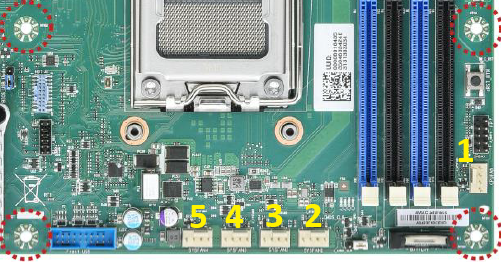
| FAN Header | Label |
|---|---|
| 1 | CPU_FAN |
| 2 | SYS_FAN_1 |
| 3 | SYS_FAN_2 |
| 4 | SYS_FAN_3 |
| 5 | SYS_FAN_4 |
IPMI Command Syntax
The following command sets the PWM duty cycle for a specific FAN channel:
ipmitool raw 0x2e 0x44 0xfd 0x19 0x00 {PWM_CHANNEL} 0x01 {DUTY_CYCLE}
| Parameter | Description |
|---|---|
{PWM_CHANNEL} |
PWM channel byte (see table below) |
{DUTY_CYCLE} |
Duty cycle value: 0 (stopped) to 100 (full speed) |
PWM Channel Mapping
| FAN Label | PWM Channel | Channel Byte |
|---|---|---|
| CPU_FAN | PWM-0 | 0x00 |
| SYS_FAN_1 | PWM-1 | 0x01 |
| SYS_FAN_2 | PWM-2 | 0x02 |
| SYS_FAN_3 | PWM-3 | 0x03 |
| SYS_FAN_4 | PWM-4 | 0x04 |
Adjust FAN Speed
Set All FANs to 50% Duty Cycle
ipmitool raw 0x2e 0x44 0xfd 0x19 0x00 0x00 0x01 50
ipmitool raw 0x2e 0x44 0xfd 0x19 0x00 0x01 0x01 50
ipmitool raw 0x2e 0x44 0xfd 0x19 0x00 0x02 0x01 50
ipmitool raw 0x2e 0x44 0xfd 0x19 0x00 0x03 0x01 50
ipmitool raw 0x2e 0x44 0xfd 0x19 0x00 0x04 0x01 50
Remote Access via LAN (lanplus)
To send the command from a remote management host, add -I lanplus -H {BMC_IP} -U {username} -P {password}:
ipmitool -I lanplus -H {BMC_IP} -U root -P {password} raw 0x2e 0x44 0xfd 0x19 0x00 0x01 0x01 50
Example: Adjusting SYS_FAN_1
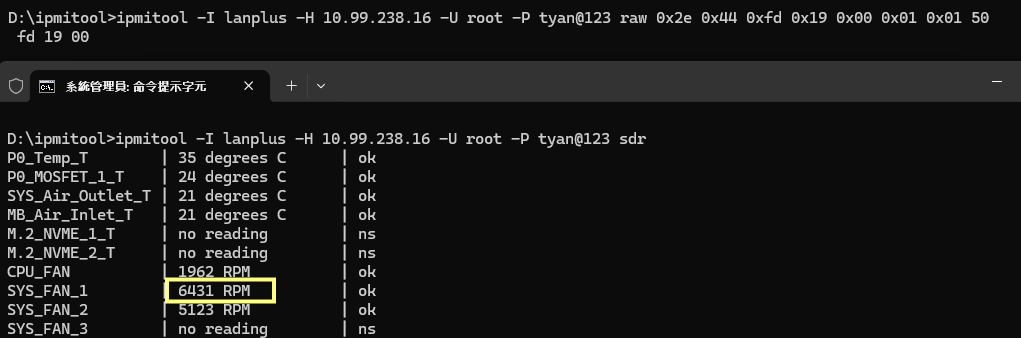
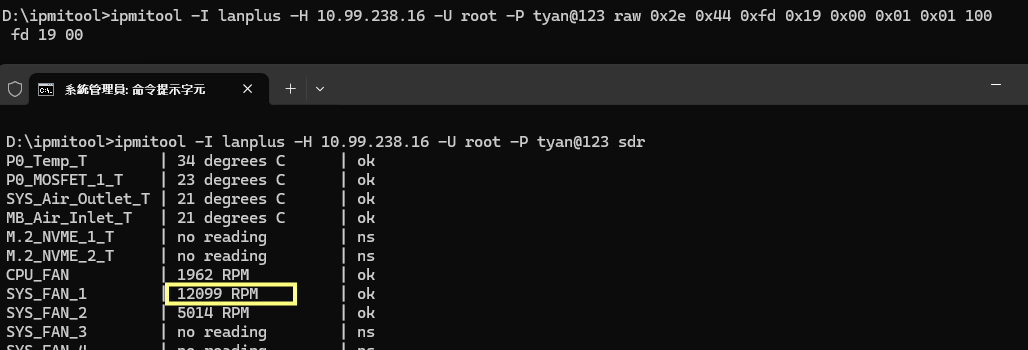
The following example demonstrates setting SYS_FAN_1 (PWM-1) to full speed (duty-100) and then reducing it back to 50%.
Set SYS_FAN_1 to Full Speed (duty-100)
ipmitool -I lanplus -H 10.99.238.16 -U root -P tyan@123 raw 0x2e 0x44 0xfd 0x19 0x00 0x01 0x01 100
Verify the result with ipmitool sdr. SYS_FAN_1 should spin up to approximately 12099 RPM.
Set SYS_FAN_1 Back to 50% (duty-50)
ipmitool -I lanplus -H 10.99.238.16 -U root -P tyan@123 raw 0x2e 0x44 0xfd 0x19 0x00 0x01 0x01 50
Verify again with ipmitool sdr. SYS_FAN_1 should reduce to approximately 6431 RPM.